I have stated before on this website that, in my opinion, Zorin OS is one of the best Linux distributions for making the switch from Windows to Linux. Until recently, I primarily pointed out the many millions of computers worldwide that have been unable to be upgraded to Windows 11 since October of last year, after which you can no longer expect technical assistance, feature updates, or security updates from Microsoft for your current Windows 10. However, in the meantime, a new reason has emerged for current Windows 11 users to switch to Linux: the forceful manner in which Microsoft wants to shove the unwanted and inferior AI functionalities down the throats of its users without their consent. More and more Windows users are starting to get fed up with their operating system and are looking for alternatives. There are many great Linux distributions available that can be a nice and powerful alternative for switching Windows users. And Zorin OS is one of those Linux distributions that helps you escape Microsoft’s unsolicited AI grip and make your computer truly personal again. In this article, I will give a summary of what is new in the latest Zorin 18.1.
Note: This article contains affiliate links. At no additional cost to you, I will earn a small commission if you choose to click through and make a purchase via the linked website. For more information, see the Affiliate Disclaimer.
Content of the article
- Introduction
- What is new and changed in Zorin OS 18.1?
- How to get and install or upgrade to Zorin OS 18.1?
- Final words
Introduction
Zorin OS has become one of those Linux distributions I genuinely enjoy using myself and therefore recommending to others, because it manages to be polished, approachable, and far more powerful than new Linux users might expect.
Like most Linux‑based operating systems, it’s built on three main layers:
- The Linux kernel (the core engine)
- A desktop environment (the visual interface you interact with)
- A collection of software packages (apps, tools, and utilities)
What impresses me most is how naturally these pieces fit together. The moment you boot into Zorin OS, it feels familiar, especially if you’re used to Windows. The desktop is clean, elegant, and thoughtfully designed, and it doesn’t try to reinvent the wheel just for the sake of being different.
The Core edition of Zorin OS is completely free, yet it delivers an experience that feels refined and instantly comfortable. And because it’s built on Ubuntu, you get the stability of a rock‑solid Linux foundation, access to a huge software library, and a community that is helpful and has been growing for decades.
What I really appreciate is how well Zorin OS strikes a balance that many systems struggle with:
- It’s easy enough for beginners to dive in without feeling overwhelmed.
- It’s stable and reliable enough for advanced users to stick with it long-term.
Version 18.1 continues that trend beautifully. Whether you’re already familiar with Linux or you are simply tired of Windows, Zorin OS 18.1 offers a modern, smooth, and powerful experience that works on the computer you already have. For me, Zorin OS is one of the clearest examples that a free, stable, and long‑term supported alternative to Windows doesn’t have to feel like a compromise. It can feel like a real upgrade.
And before I move on, there’s something worth highlighting. In just the six months since the previous Zorin OS 18 came out, it has already been downloaded over 3.3 million times. That is an incredible number, and it really shows how quickly Zorin OS is gaining traction and winning people over.
What is new and changed in Zorin OS 18.1?
The new Zorin OS 18.1 has been released. This is what the Zorin team says about this release:
“We’re thrilled to launch Zorin OS 18.1, just six months after the release of Zorin OS 18 and over 3.3 million downloads later. It adds polish, new features, and better hardware support to our record-breaking version of Zorin OS. That means you’ll get an even better computing experience, whether you’re an existing Zorin OS user or you’re starting to make the switch from Windows.”
So, let’s have a look at what the new Zorin OS 18.1 has to offer.
Further expanded database to detect Windows app alternatives
One of the things I really appreciate in Zorin OS is how it tries to make the transition from Windows as smooth as possible. A unique Zorin OS feature that I don’t know of in any other Linux distribution is the built-in functionality and underlying database that helps to advise on alternatives to Windows installer files. When you try to install a Windows application (which is also possible via built-in Windows support), this functionality will in many cases indicate whether a native version of this same app is available and can be installed on Linux, or, when a native Linux installer is not available, whether there is a comparable Linux application available that can be a good replacement for the Windows app you are trying to install.

In Zorin OS 18.1, the team has expanded the built‑in database that recognizes Windows installer files by more than 40%. It now covers over 240 popular apps, which means Zorin OS can give you even better guidance when you try to run a Windows executable.
This functionality is therefore extremely valuable for people who switch from Windows to Linux, who often do not yet have the knowledge of all the alternative applications available for Linux.
Improved advanced window tiling
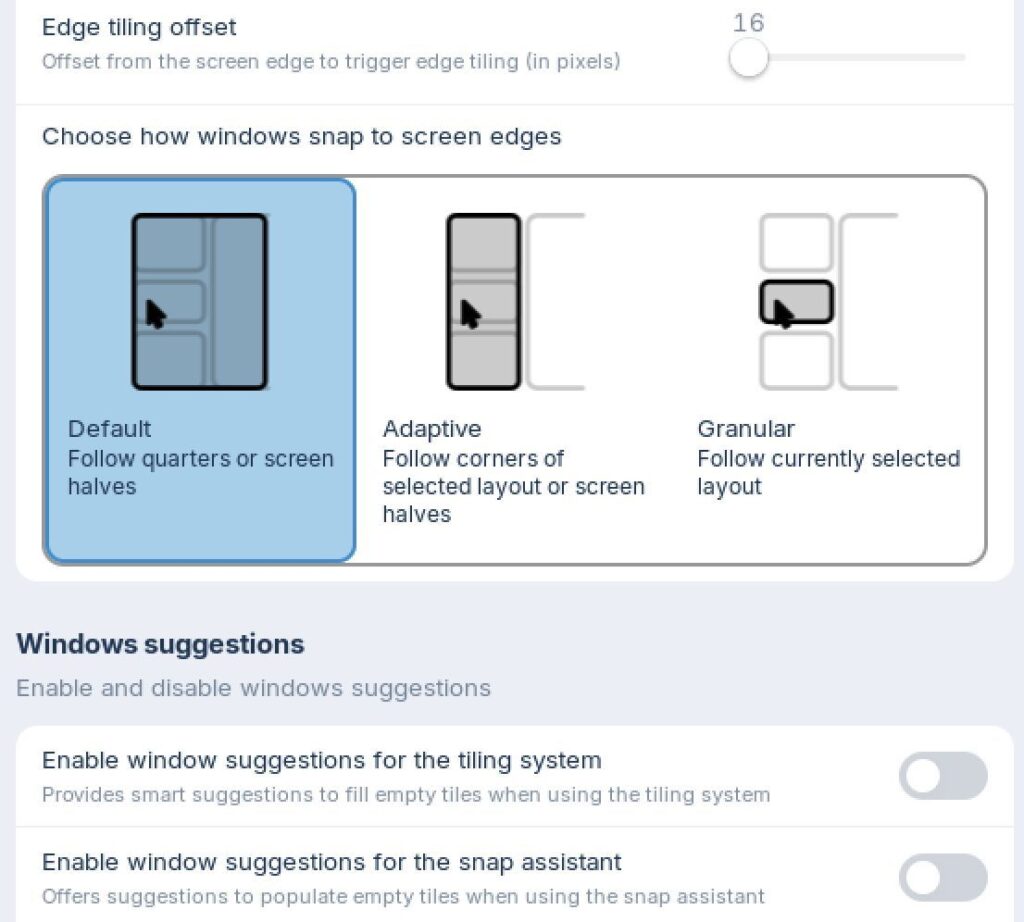
Zorin OS 18.1 brings some nice refinements to the desktop. The Advanced Window Tiling feature, as part of the previous Zorin OS 18, has now gained even more options. You can find these options via Zorin Menu / Zorin Appearance / Windows / Advanced Windows Tiling. You can now bring all tiled windows to the front when switching from the taskbar or dash, reorder your custom tiling layouts, and use improved edge tiling that snaps windows into your active layout instead of just halves or quarters.
Improved support for right‑to‑left languages
There’s also improved support for users of right‑to‑left languages like Arabic, Hebrew, or Urdu. The panel or dash now fully adapts to right‑to‑left language layouts, making the whole interface feel more natural and consistent.
Better control for icons in the panel tray
Some apps place their own icons in the panel tray, and Zorin OS now gives you more control over how these appear. A new toggle for “Tray Icons in the Panel” and additional settings in Zorin Appearance let you decide exactly how you want them displayed.

Faster desktop experience
And not the least, you probably will notice, as an existing Zorin OS user, that your system feels a bit snappier, thanks to some performance improvements and bug fixes implemented for the desktop environment.
The most recent LibreOffice
LibreOffice is an important office suite for a lot of Linux users and it has always been a core part of Zorin OS. In this release, it gets a major upgrade, as Zorin OS 18.1 includes the latest LibreOffice 26.2. This version offers improved compatibility with Microsoft Office/365 files, support for Markdown, new connector shapes in Calc and Writer, performance boosts, and a long list of refinements, which you can find here.
Updated apps
A lot of the applications in Zorin OS 18.1, available and pre‑installed, have been updated to more recent versions, so you have a more complete and feature‑rich experience right from the start. This also means fewer updates to download right after installation of or upgrade to Zorin OS 18.1. And because Zorin OS supports Flatpak, AppImage, and Snap out of the box, you will always have the latest versions of these applications as well.

Zorin OS 18.1 Lite edition
Next to the main version of Zorin OS 18.1, there is also a special Lite edition, which is developed specifically with older, lower-spec computers in mind. Compared to the previous Zorin OS 17.3 Lite, Zorin OS 18.1 Lite brings all the improvements from the latest upstream desktop environment with the XFCE 4.20 desktop environment, it offers a redesigned File Manager with is cleaner, more efficient, and better suited for smaller screens, it offers fingerprint reader support, so you can now enroll fingerprints directly from the Settings app, it offers updated themes and improved Web App integration, so you can turn any website into a desktop app with ease, and launch them just like your native applications
If you have an old laptop lying around, this Zorin OS 18.1 Lite edition can give it a surprisingly modern and responsive second life.
Better security and compatibility
Under the hood, Zorin OS 18.1 brings a lot of important improvements. It now runs on the Linux kernel 6.17, which is the same version used in Ubuntu 25.10. This means better performance, stronger security, and broader hardware support. This includes improved compatibility with NVIDIA GPUs, Intel Xe3 graphics, AMD hybrid laptop GPUs, Lenovo ThinkPad and Samsung Galaxy Book laptops, Apple input devices like the Magic Mouse 2 and Touch Bar, game controllers including PS5 DualSense, Acer Nitro NGR200, and Turtle Beach Recon, and gaming handhelds such as the ASUS ROG Ally, Lenovo Legion Go, and OneXPlayer.
Security patches are also pre‑installed, so you are starting with the most secure version of Zorin OS to date. And with support lasting until June 2029, Zorin OS 18.1 is a reliable option for schools, businesses, and organizations that need long‑term stability. And you already know that with Zorin OS, future versions will also support your hardware for a very long time.
How to get and install or upgrade to Zorin OS 18.1
Zorin OS 18.1 is available starting today for anyone. You can download Zorin OS 18.1 Core, Pro, and Education from the Zorin OS Download page:
For Zorin OS 18.1 Lite, you can go here:
If you’re currently using Zorin OS 17 Lite, you can upgrade directly to the Zorin OS 18 Lite series by using the built-in Upgrade Zorin OS app.
If you have already purchased the previous Zorin OS 18 Pro, you can download a new copy of Zorin OS 18.1 Pro from the download link in your original purchase email. If you lost access to this email, you can resend it here: Resend access mail
Note: Before you start the upgrade process, I advise you to back up the files that are important to you. Have a look at my articles “How to set up and use backups in Linux“, “How to easily create backups in Linux with Pika Backup“, or “luckyBackup is a powerful backup solution for Linux” for more information on backups in Linux.
Another note: Although the very complete Core version is free of charge, maybe you are interested in buying the Zorin OS Pro edition. In that case, please consider using the below Affiliate button. At no additional cost to you, this website will earn a small commission if you choose to click through and make a purchase via the linked website. For more information, see the Affiliate Disclaimer.
(Affiliate link)
Why pay for Zorin OS Pro?
Next to the free Zorin OS Core and Education editions, there is also a paid Pro version. Zorin OS Pro brings together even more features, like additional premium desktop layouts which can be simply activated via the Zorin Appearance Layout menu, pre-installed advanced apps like a video editor, Photoshop-compatible image editor, illustration software, audio workstation, animation software, 3D graphics & effects software, and diverse productivity tools. Also, Zorin OS Pro users are entitled to technical support by email directly from the Zorin team. But probably most important, your purchase helps to support the Zorin project and the small team that makes it all possible.
Final words
I genuinely believe Zorin OS stands out as one of the best and nicest Linux-based operating systems available today. It is really polished, attractive, thoughtfully designed, complete, approachable, and impressively stable and fast. It is the kind of Linux distribution that can persuade people to leave their current operating system behind, especially now that Windows 10 has reached its end of life and Windows 11 feels increasingly cluttered with unnecessary AI features. What the Zorin team demonstrates so clearly is that Linux can be both welcoming for everyday users and powerful enough for professional workloads. Zorin OS 18.1 does not try to reinvent anything. Instead, this latest version focuses on making the transition from Windows feel even smoother and more familiar. With support running till June 2029, Zorin OS 18.1 is an easy recommendation for anyone, from home users to businesses, who wants a secure, elegant, and highly productive desktop environment and robust core. With this latest release, Zorin OS remains my top choice for all my computing needs, and it reassures me that my older hardware will continue to serve me well for years to come.
Have a look at my latest book on Linux, in Paperback or Kindle format.
For more info on my book click here.
When you want to buy the book click on the image below.
If you appreciate what I do on this website…,